Virtual worlds, naturally.
Native virtual machines for Apple Silicon. macOS, Linux and Windows 11 ARM in a translucent SwiftUI library, with disks that only grow as you use them.
Lumen is a native SwiftUI app, not a web wrapper. A calm, translucent library holds your machines. Each one opens in its own window, sized for Retina, and keeps running when you close it.
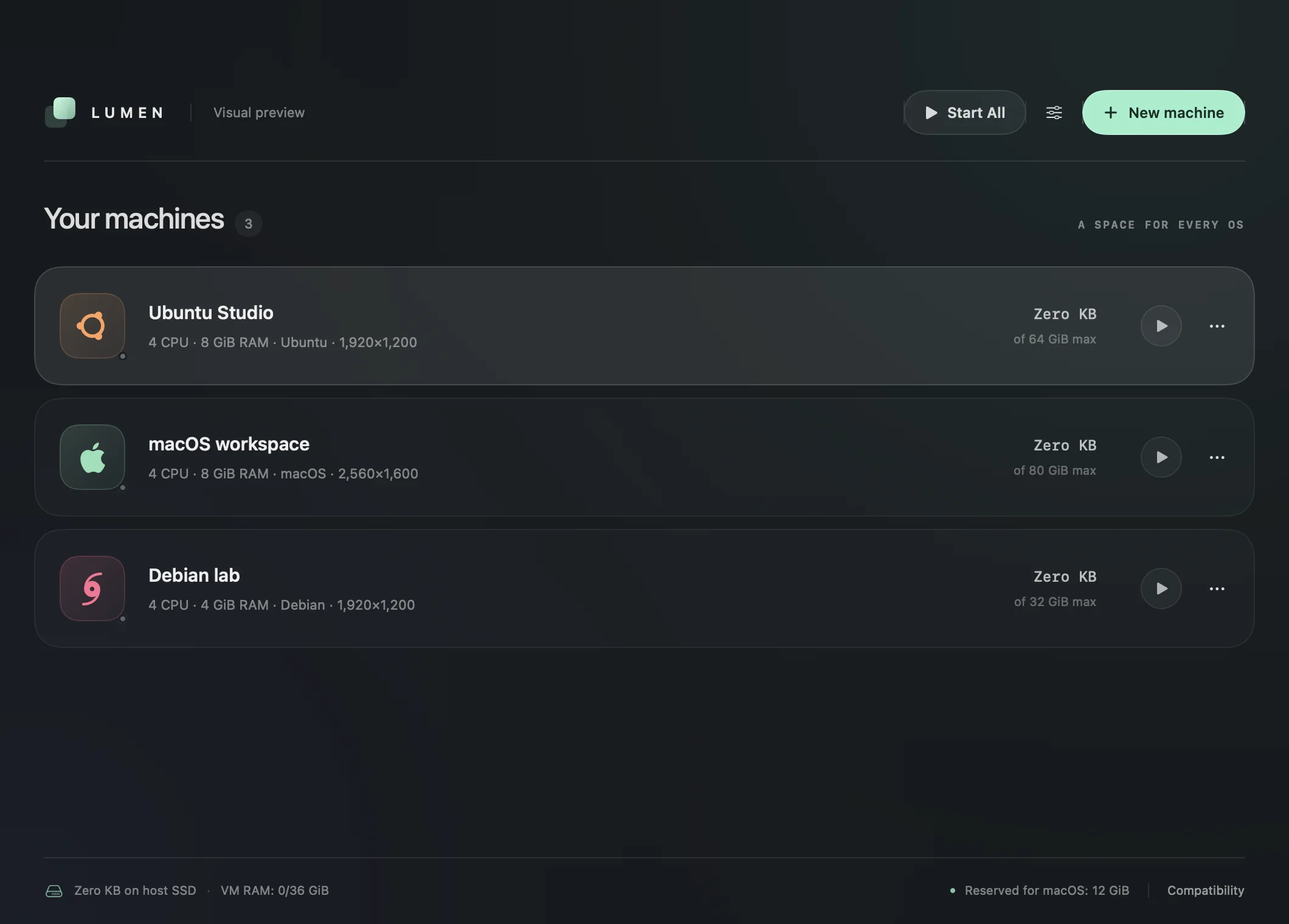
Every machine at a glance: OS, CPU, RAM, resolution and real disk use.
macOS and Linux guests run in their own app process with their own Dock tile.
Drag an ISO or IPSW onto the library, or press Command-N.
Lifecycle controls for one machine, or Start All at once.
Host SSD use, VM RAM budget and memory reserved for macOS in the footer.
Display, sound, microphone, shared folders and login helpers.
macOS and ARM64 Linux run on Apple’s own Virtualization framework. Windows 11 ARM runs on QEMU with HVF acceleration. Bring your own installer; Lumen does the rest.
- Mac trackpad and keyboard devices
- Retina displays and native full screen
- Nested virtualization on M3+ with macOS 15
A new 64 GB disk costs your SSD almost nothing. Lumen’s disks are sparse: blocks are allocated only when the guest writes them. The library shows real use, and stopped disks can grow later.
53.3 GB stays free on your Mac — with the same Ubuntu install inside.
- Zero KB for a brand-new machine
- Grow stopped disks any time
- TRIM via fstrim.timer in Linux guests
A Dock icon for every VM.
macOS and Linux guests run in separate app processes, each with its own OS tile. Close the window and the VM keeps running; click its tile to bring it back.
Rosetta inside Linux.
Opt in and x86-64 Linux binaries run in ARM64 guests. The guest tools register Rosetta with binfmt for you.
$ uname -m
aarch64
$ file ./server
./server: ELF 64-bit, x86-64
$ ./server
listening on :8080  # via Rosetta
Nested virtualization.
Run a hypervisor inside your guest on supported hosts.
Retina, for real.
Configurable resolution, automatic resizing where the guest supports it, and native full screen.
Share only what you pick.
Choose Mac folders one by one, each with its own read-only switch. VirtioFS for Linux, private SMB2 for Windows.
Linux guest tools, one click.
Lumen types the setup into the guest terminal: SPICE text clipboard, shared folders, X11 desktop startup and Void/runit services. Command-C/V works in desktop and terminal modes.
Hardened by default.
Hardened runtime, a sealed QEMU helper, SHA-256-pinned driver media and per-user Windows credentials. Optional Keychain and Touch ID login helpers.
v27.1.0 ships as source. The build script fetches pinned, checksummed drivers and guest tools, compiles a release build and signs it on your Mac with the virtualization entitlements. No installer and no account.
you@mac ~ %
Guest disks live in ~/Library/Application Support/Lumen/Machines/. Shut a guest down before changing its hardware; everything else can happen while it runs.
- 01
New machine
Press Command-N, pick an OS and an installer, or drop an ISO or IPSW onto the library.
- 02
Size it
Set CPU, RAM and the maximum disk capacity. Add only the Mac folders the guest should see.
- 03
Install the OS
Create the machine and run the guest's own installer in a native window.
- 04
Add guest tools
Linux: Install / Repair Linux Guest Tools for clipboard and folders. Windows: automatic driver setup.
Source release
zip · builds Lumen.appThe reviewed source archive for this release. Unzip it and run bash scripts/build.sh on an Apple Silicon Mac.
Download source v27.1.0Clone with git
github.com/MrZaKaRiA/LumensVMTrack main, send pull requests, or check out any tagged release. Stars are appreciated.
$ git clone https://github.com/MrZaKaRiA/LumensVM.gitRequirements
- M1+ Apple Silicon
- macOS 14 or later
- Swift 5.9 Xcode / CLT
- Homebrew for QEMU & tools
Good to know
Builds are ad-hoc signed, not notarized. Windows needs Homebrew QEMU, swtpm and Python 3.14. Bring your own ISO or IPSW.
Lumen (Lumens VM) is a native SwiftUI virtual machine manager for Apple Silicon Macs. It runs macOS and ARM64 Linux through Apple’s Virtualization framework and Windows 11 ARM64 through QEMU with HVF, in a translucent machine library with a separate window and Dock icon for every VM.
Yes. Lumen is free and open source under the MIT license. Guest operating systems keep their own licenses, and you supply your own installer images.
Apple Silicon Macs (M1 or later) with macOS 14 Sonoma or later. Intel Macs are not supported. Nested virtualization needs an M3 or later with macOS 15.
macOS on Apple Silicon (IPSW), ARM64 Linux such as Ubuntu, Debian, Fedora, Void and Abyss Linux, and Windows 11 ARM64 as an experimental guest. Android and ChromeOS are not supported.
v27.1.0 is a source release. Download the source zip or clone the GitHub repository, install the Homebrew dependencies (qemu, swtpm, python@3.14, sevenzip) and run bash scripts/build.sh. The build produces build/Lumen.app, signed locally (ad-hoc) with virtualization entitlements.
No. Lumen disks are sparse: the capacity is a limit, not space reserved upfront. A 64 GB disk only uses what the guest has actually written, and stopped disks can be grown later.
Yes, with opt-in Rosetta. Lumen’s Linux guest tools register Rosetta with binfmt so x86-64 Linux binaries run inside ARM64 Linux guests.
Not yet. Windows 11 ARM uses a VirtIO 2D display with Retina presets and resizing. Direct3D and Metal acceleration, snapshots and clones are not implemented in this release.
No. The current release is built from source on your Mac and ad-hoc signed, not Developer ID signed or notarized. A notarized installer is not published yet.